One More Minute: A Pebble Count-Up Timer with Roman Numeral Vibrations
A couple of months ago I released Almost Five, a fuzzy-text watchface for the reborn Pebble smartwatch. It's been fun hacking on watch faces, but I realized I had a practical gap: I needed a count-up stopwatch I could wear on my wrist while cooking, without pulling out my phone.
There are lots of timer apps on the Pebble App Store, but they're mostly focused on count-down scenarios, where you know exactly when the timer needs to end. But sometimes, especially in cooking, you want to know how long it's been, so that you can adjust as you go. How long has this steak been on the grill? How long have I been reducing this sauce? I don't see great stopwatch-like designs for that use-case.
So I built One More Minute, a count-up timer app with a twist -- it vibrates the Roman numeral of each completed minute on your wrist. The regular vibrations keep you in tune with the passage of time, with minimal disruption of your flow or attention.
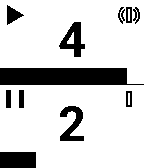
Two timers, one vibe assignment
The app displays two independent count-up timers in stacked zones. Each zone shows:
- The elapsed minutes as a large center number
- A seconds progress bar that fills left-to-right over 60 seconds
- A play/pause indicator (filled triangle when running, two bars when paused, blank at zero)
- A vibration icon showing which timer will vibrate every minute
At most one timer at a time can vibrate. You cycle the assignment with the SELECT button: timer 1 → timer 2 → none → timer 1.
The Roman numeral trick
Here's the fun part. When a timer has the vibe assignment enabled, it emits a vibration pattern encoding the Roman numeral of the completed minute:
- I = short pulse (125 ms)
- V = medium pulse (250 ms)
- X = long pulse (500 ms)
So minute 8 (VIII) vibrates as: medium, pause, short, short, short. Minute 14 (XIV) is: long, pause, short, medium. The gaps between symbols are tuned for perceptual clarity -- 100 ms between identical symbols in the same group, 350 ms between different symbol groups.
The patterns go up to 39 minutes (XXXIX), which is the practical ceiling for this small vibration engine. Beyond that, you'd need a different approach. I wrote about the background of this design a decade ago — it's been fun to finally implement a version of it.
Controls
| Button | Short press | Long press |
|---|---|---|
| UP | Start/stop timer 1 | Clear timer 1 |
| DOWN | Start/stop timer 2 | Clear timer 2 |
| SELECT | Cycle vibe assignment | — |
| BACK | Exit app | — |
Timers freeze where they are when stopped, so you can pause and resume without losing your place.
Technical notes
The app is pure C, no phone-side JavaScript. The UI is custom-drawn with layered windows — no framework shortcuts. The code was written in Kilo Code with a mix of Qwen and Claude agents.
The vibration engine is the most interesting piece. We wrote detailed specs and tests for the Roman numeral pattern generation, which made it easy to iterate on the timing gaps until they felt right on the wrist.
Try it out
The MIT-licensed source is available on GitHub. If you have a Pebble and the pebble CLI installed, you can sideload it directly:
1pebble build
2pebble install --phone <PHONE_IP>
Or test it in the emulator:
1pebble install --emulator flint
I'm looking for testers and feedback. If you build it and try it out, let me know how the vibration patterns feel in practice.